Showing posts with label CDS Views. Show all posts

Tuesday, March 8, 2022

CDS Views: Performant Status Query using the JEST Table

 The application and the system status in SAP play a very big role in many reports, search helps and evaluations. 

The conventional approach to retrieve the JEST status is to use the dedicated function module STATUS_READ or STATUS_READ_MULTI from the function group BSVA.

If you need the application or the user status just in order to exclude certain objects from a result list or a search help, it is more comfortable to use dictionary objects, such as CDS Views.

In this post I am going to demonstrate how to classify QM notifications into a group of valid and invalid. The invalid notifications include the status values 'completed' and 'cancelled' and have to be filtered out. All the other notifications are valid and have to be shown.

This can be achieved with the help of two CDS Views. 

The main CDS View contains the join with the JEST Table and casts priorities to the status values in the where clause. It is split into two, because we want to have a 'valid' or 'invalid' for every notification.


Here goes the code for the first CDS View:

@AbapCatalog.sqlViewName: 'zcds_notif_main'
@AbapCatalog.compiler.compareFilter: true
@AbapCatalog.preserveKey: true
@AccessControl.authorizationCheck: #CHECK
@EndUserText.label: 'Main View JEST, QMEL'
define view Z_CDS_NOTIF_MAIN as select distinct from qmel as notif
association [1] to jest as _jest on notif.objnr = _jest.objnr{
    _jest.objnr,
    _jest.stat,
    notif.qmnum,
    cast('invalid' as abap.char( 10 )) as status,
    cast('5' as abap.int1) as prio
} where _jest.stat = 'E0016' and  _jest.stat like 'E%' and _jest.inact = ''
// or _jest.stat = 'E0012' //completed or cancelled, maybe join with table tj30, this is just a demo!
union select distinct from qmel as notif
association [1] to jest as _jest on notif.objnr = _jest.objnr{
    _jest.objnr,
    _jest.stat,
    notif.qmnum,
    cast(' valid' as abap.char( 10 )) as status,
    cast('4' as abap.int1) as prio
} where _jest.stat != 'E0016' and  _jest.stat like 'E%' and _jest.inact = ''
//and _jest.stat != 'E0012'

The second CDS View accumulates the values of the first view, here we have one entry per QM notification, according to priority.

Here goes the code for the second CDS View:

@AbapCatalog.sqlViewName: 'ZDS_NOTIF_STATUS'
@AbapCatalog.compiler.compareFilter: true
@AbapCatalog.preserveKey: true
@AccessControl.authorizationCheck: #CHECK
@EndUserText.label: 'QMEL mit Status'
define view Z_CDS_NOTIF_STATUS as select from qmel  as NOTIF inner join zcds_notif_main as MAIN
on NOTIF.qmnum = MAIN.qmnum {
 key   NOTIF.qmnum,
 max(MAIN.status) as status,
 max(prio) as stat
} group by NOTIF.qmnum

You could create an auxiliary view on the JEST Table, using only the relevant status schema. Another improvement would be to push the 'valid / invalid' logics to a customizng table.

Have fun while trying, adjustung and improving the approach!


Monday, February 15, 2021

SAP CDS Views: Publishing an oData Service from a CDS View and Testing it (10 Simple Steps)

 In this post I am going to use the example from my previous post and publish it as an oData service in ten simple steps:

1. In the annotation part of the DDL, declare the publisher as 'true'


2. Make sure that the CDS View has at least one key field


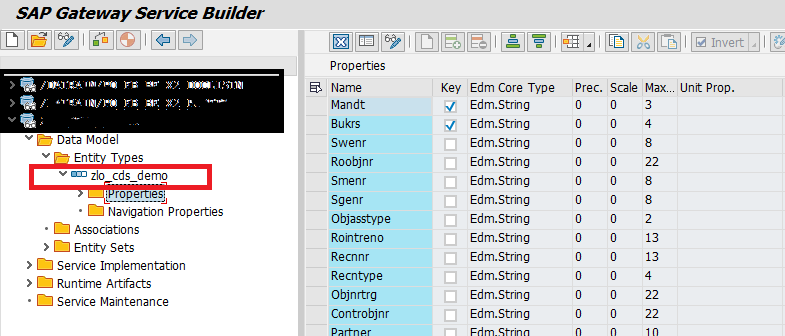
3. Go to transaction SEGW and create a new project


4. Import the Structure of the CDS View to the new project


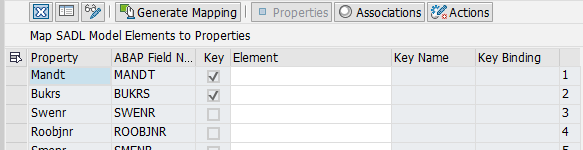
5. Map to the Data Source
6. Generate Mapping & Activate


7. Go to the Transaction /IWFND/MAINT_SERVICE 'Activate and Maintain Services' -> Add Service


Here select the System Alias and search for the Service with the name of the oData project

8. Load the Metadata and go to the Test Client


9. Coose an Entity Set you want to test.
In our example we have only one entity set.

10. Test your service


Wednesday, February 10, 2021

SAP CDS Views: Creating a CDS View with an Authorization Check

In this post I am going to demonstrate the creation of a CDS view with an authorization check. Implementing  authorization checks hand in hand with the CDS view is a great way to achieve even more code pushdown.

The example in this post is from the RE-FX module but it can be applied in every module.

I am going to redesign a common report in the real estate, for example the occupation and pull some contract and partner data.

The Data Definition Language (DDL) part looks like this:


In the annotation part it is very important to activate the authorization check.

The authorization check will be executed for the company code (BUKRS).

For this purpose we need to define an access control, the so called Data Control Language (DCL) part.


Usually, we want to integrate the standard SAP authorization checks as they are defined in PFCG.
For the company code we would refer to the dedicated authorization object F_BKPF_BUK.

The DCL grants access to the previously defined DDL zlo_demo. 

The user can see only the company codes for which they are authorized through the authorization object F_BKPF_BUK.


Tuesday, May 26, 2020

SAP ABAP CDS Views: Data-to-Code vs Code-to-Data - an example with aggregation

I am going to discuss two approaches to a requirement that I have received often from customers.

EH&S: Business wants to know the specifications where there is an instance maintained for a certain property.

In EH&S it is possible to maintain more than one intance per property. Multiple property  instantes can be confusing for the business, so  customers wanted to have an evaluation if they have EH&S specifications with multiple instances (same sort) for certain properties.

Of course, it was possible to solve the requirement with the help of an ABAP Report looking something like that:

Back-End SAP, ABAP:

The logic is in my report. (Data-to-Code Approach)


REPORT zehs_r_inst_count.

TABLES: estvh, estva, estrh.

SELECT-OPTIONS: s_estcat FOR estvh-estcat DEFAULT 'SAP_EHS_1023_094'.
select-OPTIONS: s_subid for estrh-subid.

SELECT COUNT( DISTINCT estva~recn ) AS count, estva~ord,estva~recnroot, estva~recntvh, estvh~estcat, estrh~subid
INTO TABLE @DATA(lt_inst)
FROM estva INNER JOIN estvh ON estvh~recn = estva~recntvh JOIN estrh ON estva~recnroot = estrh~recnroot
WHERE estvh~estcat IN @s_estcat and estrh~subid in @s_subid AND estva~delflg EQ @space AND estvh~delflg EQ @space
and estrh~delflg eq @space
GROUP BY estva~recnroot, estva~recntvh, estva~ord, estvh~estcat, estrh~subid.

 perform show_alv.

Nonetheless, it is far more flexible and efficient to use CDS Views and not to hold so much DB logic in the application:


Eclipse, Open SQL:

The logic is contained in the view (Code-to-Data or code pushdown Approach)


For developers who are new to SAP CDS Views appear very easy, intuitive and sql-like.

I habe been usng the data-to-code a lot in the past, so that I notice a huge efficiency improvement when using CDS Views.

I can check my view in transaction se16n:


This new programming model supports clean code and reusability.
It is satisfying to clean the application from  sql statements and to push them to the data base. 

There are many options for using the newly created view:

 - If the evaluation should be pulled only once, this can be done using transaction se16n
-  If the evaluation should be done by a user, a report or transaction can be created
-  For views that will be checked often by many users, a FIORI App can be created by publishing the view as an oData Service